Còn hàng Sản phẩm nổi bật
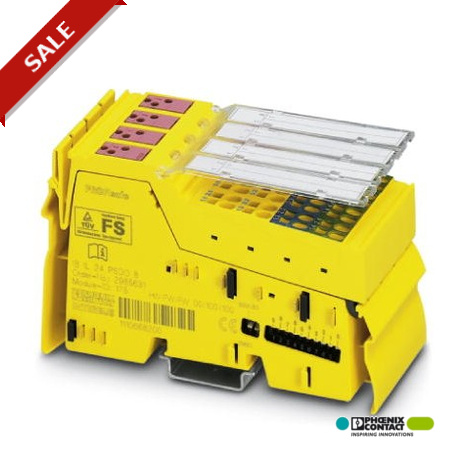
IB IL 24 PSDO 8-PAC
IB IL 24 PSDO 8-PAC 2985631 PHOENIX CONTACT Safety-oriented digital output module, IP20 degree of protection..
$0.00
USD
4928 còn hàng
Thông số kỹ thuật chính
:
2, 3, 4-wire
Độ sâu:
71.5 mm
Chiều rộng:
48.8 mm
Chiều cao:
119.8 mm
Thông tin nhà cung cấp
Sản phẩm: 0
Thường giao hàng trong vòng 2-3 ngày làm việc.
Đảm bảo chất lượng
Giao hàng nhanh
Hỗ trợ kỹ thuật
Thông số kỹ thuật
| Tham số | Giá trị |
|---|---|
| 2, 3, 4-wire | |
| Độ sâu | 71.5 mm |
| Chiều rộng | 48.8 mm |
| Chiều cao | 119.8 mm |
| Trọng lượng tịnh | 245.6 g |
| Chỉ định | Inline local bus |
| Tên đầu ra | Digital outputs |
| Loại lắp đặt | DIN rail |
| Dòng điện đầu ra | max. 6 A (Total current of all outputs, -25 °C ... 50 °C) |
| Điện áp đầu ra | 24 V DC (US- 1 V) |
| Điện áp nguồn | 24 V DC (via voltage jumper) |
| Hệ thống Fieldbus | INTERBUS |
| Phương thức kết nối | Inline data jumper |
| Số lượng đầu ra | 4 (with two-channel assignment) |
| Tải định mức, đèn | see safety data |
| Lưu ý về kích thước | Housing dimensions |
| Mạch bảo vệ | Overload protection, short-circuit protection of outputs |
| Tốc độ truyền tải | 500 kBit/ / 2 MBit/s (can be switched) |
| Mức tiêu thụ hiện tại | max. 230 mA (from the local bus) |
| Tải định mức, điện trở | see safety data |
| Mức độ bảo vệ | IP20 |
| Thông báo chẩn đoán | Short-circuit / overload of the digital outputs Error message in diagnostics code (bus) and display by means of the LED on the motor |
| Phạm vi điện áp nguồn | 19.2 V DC ... 30 V DC |
| Nguồn cấp mạch chính UM | 24 V DC |
| Điện áp đầu ra danh nghĩa | 24 V DC |
| Nguồn điện truyền thông UL | 7.5 V (via voltage jumper) |
| Tải định mức, cảm kháng | see safety data |
| Dải điện áp cung cấp UM | 19.2 V DC ... 30 V DC (including all tolerances, including ripple) |
| Áp suất không khí (hoạt động) | 80 kPa ... 108 kPa (up to 2000 m above sea level) |
| Mức tiêu thụ hiện tại từ UL | max. 230 mA (see safety data) |
| Mức tiêu thụ hiện tại từ UM | typ. 30 mA (all outputs set including actuator current) |
| Lưu ý về thông số trọng lượng | with connectors |
| Nhiệt độ môi trường (khi hoạt động) | -25 °C ... 55 °C |
| Áp suất không khí (lưu trữ/vận chuyển) | 66 kPa ... 108 kPa (up to 3500 m above mean sea level) |
| Phân loại theo tiêu chuẩn EN 13849-1 | 4 |
| Dòng điện đầu ra tối đa trên mỗi nhóm | 3 A |
| Độ ẩm cho phép (khi vận hành) | 10 % ... 85 % (Take suitable measures against increased air humidity within the permitted temperature range.) |
| Dòng điện đầu ra tối đa trên mỗi mô-đun | 3 A (See technical data) |
| Dòng điện đầu ra tối đa trên mỗi kênh | 2 A |
| Nhiệt độ môi trường xung quanh (bảo quản/vận chuyển) | -25 °C ... 70 °C |
| Độ ẩm cho phép (khi bảo quản/vận chuyển) | 10 % ... 85 % (Take suitable measures against increased air humidity within the permitted temperature range.) |
Mô tả sản phẩm
Safety-oriented, IP20-rated digital output module for SafetyBridge, INTERBUS-Safety and PROFIsafe systems. The module has 4 secure digital outputs with two-channel occupancy or 8 secure digital output
Các tính năng chính
- Chất lượng cấp công nghiệp
- Tuân thủ tiêu chuẩn RoHS
- Đạt chứng nhận CE
- Bảo hành 1 năm
Thông tin kỹ thuật chi tiết
The safety module is an output module from the Inline product range, designed for use in an INTERBUS-Safety or PROFIsafe system. The safety module can be used as part of an Inline station at any point within an INTERBUS-Safety or PROFIsafe Inline system. The transmission speed of the safety module can be set to 500 kbaud or 2 Mbaud using a switch. Only one transmission speed must be used uniformly within a station. The module has four safe digital outputs for two-channel assignment or eight safe digital outputs for single-channel assignment. The outputs can be parameterized according to the application and enable the integration of actuators in the safe INTERBUS system (INTERBUS-Safety) and in the PROFIsafe system. Depending on the installation and parameterization, in these systems the safety module can achieve the following safety integrity:
Tài liệu sản phẩm
Bảng dữ liệu
Thông số kỹ thuật và dữ liệu hiệu năng
Hướng dẫn sử dụng
Hướng dẫn cài đặt và vận hành


